Heatmaps

Discover hot places of your website.

Heatmaps visualize the most and least utilized areas of your website.
See where users click and what they ignore
Track user attention across your pages
Optimize page layout with real data
Setup in minutes. No credit card required.
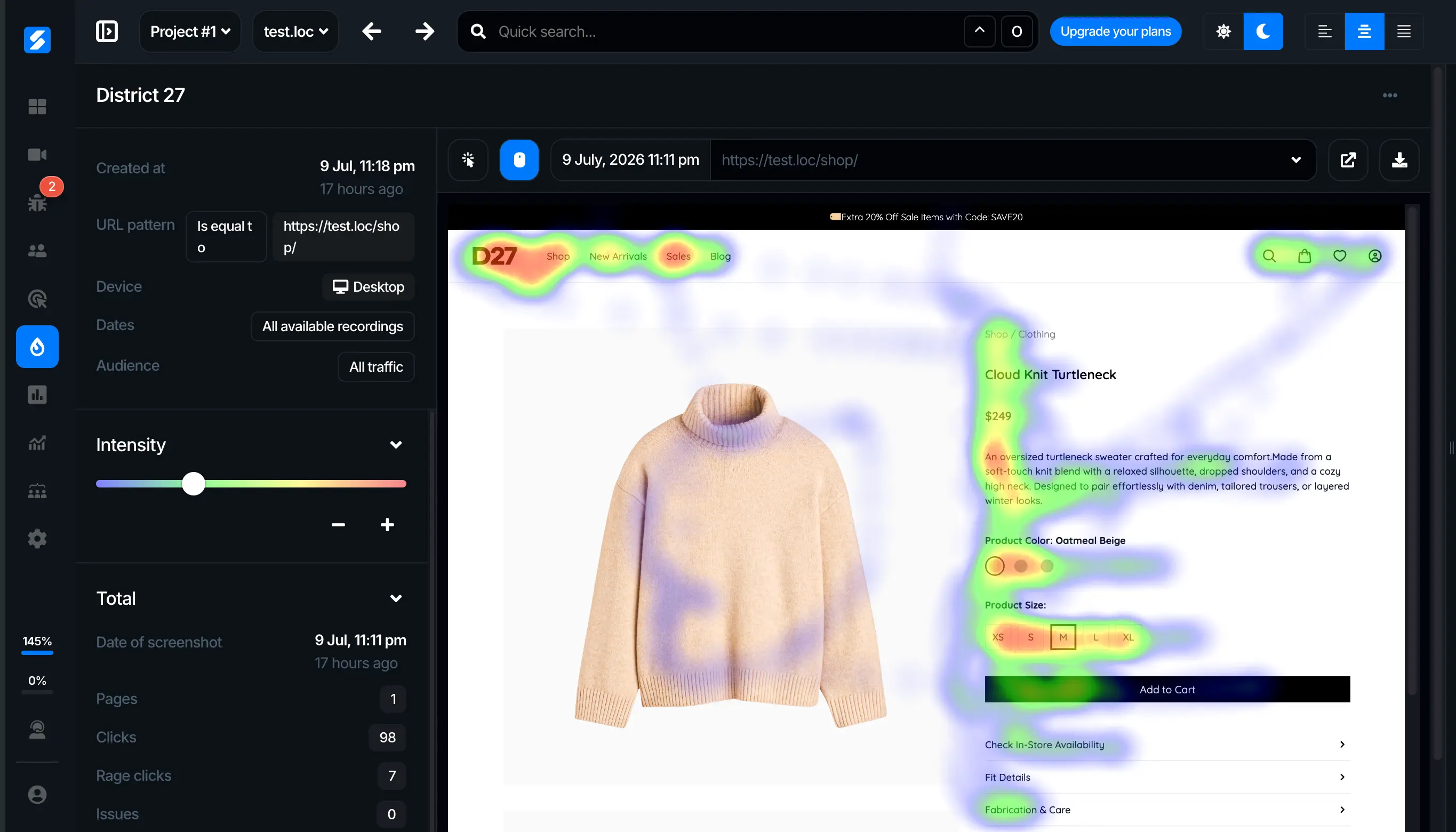
Understand User Engagement

Get a visual analysis of user behavior for every page on your site.
Hottest elements
example.com/pricing
“Start trial” button
41%
Plan comparison
23%
Log in
12%
Discover Hot Places
Identify areas that capture users' attention and those they tend to overlook.
Ignored elements
example.com/pricing
3 found
Feature tour banner0 clicks
Newsletter sign-up0 clicks
Customer logos carousel2 clicks
Eliminate the Unnecessary
Identify elements that users never engage with.
By device
Same page, different behavior
Desktop
Tablet
Phone
Improve Cross-Platform
Examine how the usage of your site varies across phone, tablet, and computer.
Pricing page test
Clicks on the main button
Variant A 18%
Variant B 31%
Strengthen A/B Testing
Analyze better by generating heatmaps for all A/B testing variations.

Three Heatmaps, One Clear Picture

Clicks, mouse movement and scroll depth for every page — included on every plan.
example.com/pricing
Last 7 days · 3,412 page views
Clicks Moves Scroll
example.com/pricing
Choose
Choose
41% of clicks
Fewer clicks
More clicks
example.com/product/runner
Last 7 days · 2,186 page views
Clicks Moves Scroll
example.com/product/runner
Add to cart
Most attention
Less attention
More attention
example.com/
Last 7 days · 8,930 page views
Clicks Moves Scroll
example.com
Get started
Average fold
100% reached
72%
41%
18%
Fewer visitors
All visitors

From Install to Insight in Minutes

Add Strabber once and start seeing how visitors use your pages.
1
Add the script
Add the Strabber tracking script to your website once.
<script async src="…/client.js"></script>
2
Choose a page
Create a heatmap for any page you want to understand better.
example.com/pricingCreate
3
See where users engage
Switch between click, move and scroll maps and act on what you find.
ClicksMovesScroll
Setup in minutes. No credit card required.

Useful for Teams Focused on Growth and UX

Heatmaps help every role understand user attention and improve performance.
UI/UX Designers
See exactly where users focus — and where they don’t.
Design interfaces based on real attention, not assumptions.
  • Identify high-attention and ignored areas
  • Improve visual hierarchy and layout
  • Optimize content placement and structure
  • Validate design decisions with real data
  • Reduce friction in key user flows
Example insight
“Users ignore important content placed below the fold”
Why it matters
Repositioning content improves engagement and usability
Digital Marketers
Optimize pages based on real user attention.
Understand what drives engagement and what gets ignored.
  • Analyze landing page performance visually
  • Optimize CTA placement and visibility
  • Identify drop-off zones on long pages
  • Improve messaging and content structure
  • Increase campaign effectiveness
Example insight
“Campaign visitors click the navigation menu instead of the offer”
Why it matters
Removing distractions keeps paid traffic focused on converting
Growth / CRO Specialists
Find what blocks conversions — and fix it fast.
Use heatmaps to uncover hidden friction in your funnels.
  • Identify conversion blockers instantly
  • Analyze user behavior across funnels
  • Test and validate optimization hypotheses
  • Discover missed opportunities for growth
  • Improve performance with data-backed changes
Example insight
“Users drop off before reaching key conversion elements”
Why it matters
Removing friction leads to measurable conversion growth
E-commerce Managers
See what drives purchases — and what doesn’t.
Understand how users interact with products and buying flows.
  • Analyze product page engagement
  • Optimize “Add to cart” visibility
  • Improve checkout flow usability
  • Identify distractions in buying journeys
  • Increase revenue through better UX
Example insight
“Users focus on images but ignore the purchase button”
Why it matters
Improving layout increases add-to-cart rate and sales
Product Managers
Understand what features actually get attention.
See how users interact with key product areas.
  • Measure feature visibility and engagement
  • Identify underused functionality
  • Validate product decisions
  • Support roadmap prioritization
  • Align product with real usage
Example insight
“A new feature receives little to no interaction”
Why it matters
Improves feature adoption and product focus
Got more questions? Our 24/7 support team is here and eager to assist you with answers.

Frequently Asked Questions

What types of heatmaps are available?
Click, move and scroll heatmaps. All three are included on every plan, including Free.
How many heatmaps can I run at once?
It depends on your plan: 5 active heatmaps on Free, 20 on Basic, 100 on Pro and unlimited on Business.
Can I compare phones, tablets and computers?
Yes. You can examine how people use the same page on phone, tablet and computer, and spot layout problems that only show up on one of them.
Can I use heatmaps for A/B tests?
Yes. Generate a heatmap for each A/B testing variation to see how the changes affect what visitors click and read.
Is there a free plan?
Yes. The Free plan includes all heatmap types with 5 active heatmaps, and no credit card is required.

Start unlocking user insights today

Discover how session recordings can transform the way you understand and improve your website. Get started in minutes!